Contents
At a glanceSide-by-side comparisonSpaceGlareFlexibilityCompatibility and powerOur verdictFAQsWorking in the evening, your screen is bright but the desk around it is dim. Notes are hard to read and your eyes keep adjusting between the glowing monitor and the shadowy desk. A desk lamp is the obvious fix, though it often throws glare onto the screen. A monitor light bar is a newer option that clips onto the top of the screen and points light down. Each solves the problem in its own way.
This guide compares the two on desk space, glare, flexibility and compatibility. It should help you decide whether you need a tidy bar that lights the strip in front of your keyboard, or a lamp you can swing over a sketchbook or a pile of paperwork. It also covers when using both makes sense, since they are not always competing for the same job on a busy desk.
At a glance
LED desk lamp

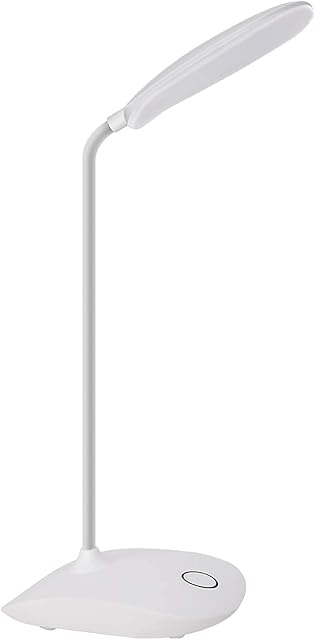

Popular choices include the 40cm LED Desk Lamp (£13.99), DEEPLITE LED Desk Lamp (£12.59) and Desk Aluminium LED Desk Lamp (£18.79).
See the whole led desk lamps range.
Monitor light bar


Popular choices include the Quntis 41cm Monitor Light Bar (£33.99), Quntis 40cm Monitor Light Bar (£30.59) and Quntis 41cm White Monitor Light Bar with Remote (£33.99).
See the whole monitor light bars range.
Side-by-side comparison
| Feature | Desk lamp | Monitor light bar |
|---|---|---|
| Best for | Flexible task lighting | Lighting the desk without glare |
| Desk space | Uses some | None |
| Flexibility | High | Fixed area |
| Glare | Depends on position | Designed to avoid screen glare |
| Price | Low to moderate | Low to moderate |
Space
A light bar sits on the monitor itself, held by a weighted clip or bracket, so it uses no desk space at all. The cable usually runs down the back of the screen to a USB port. A desk lamp needs a base or a clamp. A weighted base takes a patch of desk, while a clamp lamp fixes to the edge and leaves the surface clear but uses up an edge you might want for a monitor arm. On a small desk, that difference is often the deciding factor.
Glare
Light bars are shaped to aim light down and forward onto the desk, cutting it off before it reaches the screen. That stops the reflections and washed-out patches you can get from a lamp. A desk lamp can avoid glare too, but you have to position it with care: to the side, with the shade angled away from the monitor. Lamps with a deep shade or an asymmetric head make this easier. Bare bulbs and wide, shallow shades tend to cause the most trouble.
Flexibility
Lamps win on flexibility. An articulated arm lets you angle light onto a document, a drawing board, a keyboard or a piece of craft work, then swing it away. Some have a long reach for wide desks. A light bar lights a fixed strip in front of the screen and nothing else. That suits typing and the odd note, but not close work at the far side of the desk. If you do hands-on tasks away from the screen, a lamp is more useful.
Compatibility and power
Light bars must fit your monitor's top edge. Check the clip suits the bezel thickness, whether it handles a curved screen, and whether it clashes with a webcam mounted on top. Most run from USB, so you need a free port on the monitor or computer, or a USB plug. Desk lamps work with any setup and usually plug straight into the wall. Some newer lamps also run from USB, which helps if sockets are scarce.
Our verdict
For a compact desk with a single monitor, a light bar is tidy and keeps glare off the screen. Confirm the clip suits your screen's thickness and curve, check you have a spare USB port, and decide where your webcam will go before ordering.
For paperwork, drawing or any task away from the keyboard, a desk lamp is more versatile. Pick one with an adjustable arm and a shaded head, and place it to the side so light falls on the desk, not the monitor.
Prefer to browse everything? Our full ranges of led desk lamps and monitor light bars have more sizes, finishes and price points than we could fit here.
Frequently asked questions
Do monitor light bars fit curved monitors?
Some do, using a clip designed for curved backs, while others need a flat top edge to sit level. Check the product listing for curved monitor support and any limit on the curve rating. Thin or unusually shaped bezels can also cause problems, so measure first.
Can I use a light bar and a desk lamp together?
Yes, and it works well on a busy desk. The bar handles the area in front of the keyboard, while the lamp covers paperwork or a side surface. Keeping both at a similar colour temperature stops the desk looking patchy, with one warm area and one cold.
Which is better for eye comfort?
Either can help by reducing the contrast between a bright screen and a dark room. What matters most is position, brightness and avoiding reflections on the screen. Dimming controls and warmer settings for evening work are useful on both types.
Do light bars need USB power?
Most are USB powered and plug into a port on the monitor or computer, or into a USB wall adapter. Check the bar's power needs, since some monitor ports supply less current than others. A wall adapter is the reliable fallback if the light flickers or will not reach full brightness.